SwQolSuite: Difference between revisions
mNo edit summary |
m Added newline to Repository |
||
| (6 intermediate revisions by 2 users not shown) | |||
| Line 1: | Line 1: | ||
swQolSuite is a | {{DISPLAYTITLE:swQolSuite}} | ||
swQolSuite is a quality-of-life mod originally created by PieKing1215 that contains a collection of various editor improvements and tweaks, including in-game XML-editing, multithreaded asset loading, and more. | |||
''' | '''swQolSuite technically violates the Stormworks EULA''', as it injects into and modifies the running game. The developers have implied that they don't take action against tools like this, as long as they aren't used for cheating, griefing, or other malicious pruposes. That said, this isn't an official exception, use it at your own risk. | ||
The original creator of swQolSuite stopped maintaining the tool after Stormworks' new EULA was released. The version referenced to in this page is a fork maintained by HvTcCore, which is kept relatively up to date and has more features. | |||
'''Repository:''' | |||
https://github.com/HvTcCore/swQolSuite | |||
== Installation (Windows) == | |||
swQolSuite is a DLL injection mod, it's highly likely that your antivirus will flag it. If you have issues downloading it, disable Real Time Protection in Windows Defender for the duration of the installation, and add an exclusion to the Stormworks folder. Ensure you enable Real Time Protection afterwards. | |||
# Go to the [https://github.com/HvTcCore/swQolSuite/releases Releases page] of the repository | |||
# Download the .ZIP archive for the most recent release. In this case, you can choose between the main branch, or the branch that includes SWRIPE, a more advanced property editor.[[File:Swqolsuite-github-releases.png|frameless|860x860px]] | |||
# Extract the downloaded .ZIP file to a folder of your choice, but It's best practice to pick a permenant dedicated folder (e.g., <code>/Stormworks/swQolSuite/</code>) rather than your Downloads folder. This makes it easier to remember where it is, and less likely for it to be automatically cleaned up by Windows. | |||
< | You should now have a folder containing <code>swqols.dll</code> and <code>swqols-inject.exe</code>. | ||
</ | |||
== Launching swQolSuite == | |||
swQolSuite works by injecting code into the game, so it needs to be run ''after'' Stormworks has launched. | |||
# Start Stormworks normally through Steam and wait for it to fully load. | |||
you | # Run <code>swqols-inject.exe</code> from the folder where you extracted it. | ||
If it worked, swQolSuite will attach to the game and you will have a ImGUI menu in the top-left of your screen. | |||
== Automatic Launching == | |||
If you don't want to manually launch swQolSuite every time you need it, you can set Steam to launch it automatically alongside the game by using a small batch script. | |||
# '''Create the launcher script''' | |||
<syntaxhighlight lang="batch"> | ## Create a new text file anywhere you like (e.g., your swQolSuite folder inside of the root Stormworks folder), and name it <code>swQolSuite_launcher.bat</code> | ||
@echo off | ### If you don't see the .bat file extension when renaming, enable File name extensions in View > Show inside of File Explorer. | ||
## Right-click the file and choose Edit (or Edit in Notepad). | |||
## Paste the following into the file:<syntaxhighlight lang="batch">@echo off | |||
start "" "C:\Program Files (x86)\Steam\steamapps\common\Stormworks\stormworks64.exe" | start "" "C:\Program Files (x86)\Steam\steamapps\common\Stormworks\stormworks64.exe" | ||
start "" "PATH_TO_SwQolSuite_EXE" | timeout /t 10 /nobreak >nul | ||
</syntaxhighlight> | start "" "PATH_TO_SwQolSuite_EXE"</syntaxhighlight> | ||
## Edit the two paths: | |||
### Replace <code>C:\Program Files (x86)\Steam\steamapps\common\Stormworks\stormworks64.exe</code> with the actual path to your Stormworks install, '''only if''' your game isn't installed in the default Steam location. | |||
### Replace <code>PATH_TO_swQolSuite_EXE</code> with the full path to <code>swqols-inject.exe</code> from above. | |||
## Save the file and close Notepad. | |||
# '''Point Steam at the script''' | |||
## In Steam, right-click Stormworks: Build and Rescue > Properties. | |||
## In the Launch Options field, enter <code>PASTE_THE_PATH_HERE %command%</code> | |||
## In File Explorer, right-click your <code>swQolSuite_launcher.bat</code> file and choose Copy as path. | |||
## Back in Steam's Launch Options field, replace <code>PASTE_THE_PATH_HERE</code> with what you've just copied, keeping %command% at the end. | |||
## Close the Properties window. | |||
#'''Test it''' | |||
##Launch Stormworks from Steam as usual. A command prompt window should briefly appear, then the game should start with swQolSuite already running alongside it. | |||
== Updating == | |||
swQolSuite doesn't automatically update, so when the game updates, you might need to as well. | |||
# Download the newest ZIP from the [https://github.com/HvTcCore/swQolSuite/releases Releases page]. | |||
# Extract it into your existing swQolSuite folder, overwriting the old files. | |||
You shouldn't need to make any changes to your launcher script or Steam launch options, since they point at the path, not a particular version. | |||
{{DEFAULTSORT:swQolSuite}} | |||
Latest revision as of 05:50, 23 September 2026
swQolSuite is a quality-of-life mod originally created by PieKing1215 that contains a collection of various editor improvements and tweaks, including in-game XML-editing, multithreaded asset loading, and more.
swQolSuite technically violates the Stormworks EULA, as it injects into and modifies the running game. The developers have implied that they don't take action against tools like this, as long as they aren't used for cheating, griefing, or other malicious pruposes. That said, this isn't an official exception, use it at your own risk.
The original creator of swQolSuite stopped maintaining the tool after Stormworks' new EULA was released. The version referenced to in this page is a fork maintained by HvTcCore, which is kept relatively up to date and has more features.
Repository: https://github.com/HvTcCore/swQolSuite
Installation (Windows)
swQolSuite is a DLL injection mod, it's highly likely that your antivirus will flag it. If you have issues downloading it, disable Real Time Protection in Windows Defender for the duration of the installation, and add an exclusion to the Stormworks folder. Ensure you enable Real Time Protection afterwards.
- Go to the Releases page of the repository
- Download the .ZIP archive for the most recent release. In this case, you can choose between the main branch, or the branch that includes SWRIPE, a more advanced property editor.
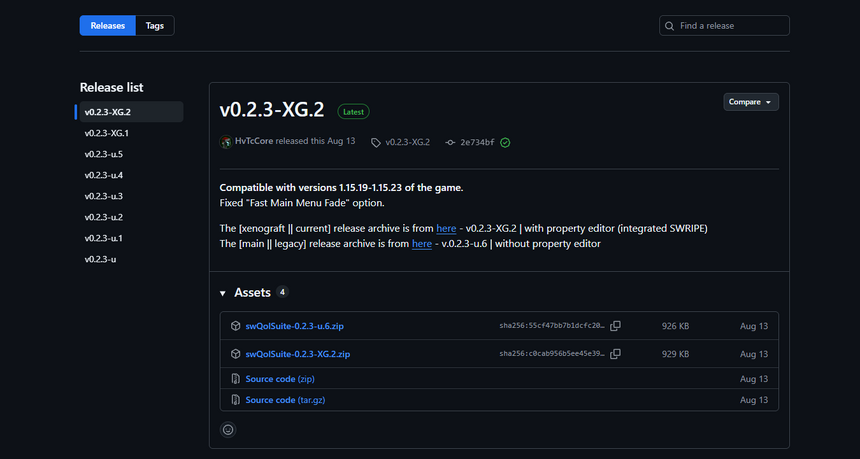
- Extract the downloaded .ZIP file to a folder of your choice, but It's best practice to pick a permenant dedicated folder (e.g.,
/Stormworks/swQolSuite/) rather than your Downloads folder. This makes it easier to remember where it is, and less likely for it to be automatically cleaned up by Windows.

You should now have a folder containing swqols.dll and swqols-inject.exe.
Launching swQolSuite
swQolSuite works by injecting code into the game, so it needs to be run after Stormworks has launched.
- Start Stormworks normally through Steam and wait for it to fully load.
- Run
swqols-inject.exefrom the folder where you extracted it.
If it worked, swQolSuite will attach to the game and you will have a ImGUI menu in the top-left of your screen.
Automatic Launching
If you don't want to manually launch swQolSuite every time you need it, you can set Steam to launch it automatically alongside the game by using a small batch script.
- Create the launcher script
- Create a new text file anywhere you like (e.g., your swQolSuite folder inside of the root Stormworks folder), and name it
swQolSuite_launcher.bat- If you don't see the .bat file extension when renaming, enable File name extensions in View > Show inside of File Explorer.
- Right-click the file and choose Edit (or Edit in Notepad).
- Paste the following into the file:
@echo off
start "" "C:\Program Files (x86)\Steam\steamapps\common\Stormworks\stormworks64.exe"
timeout /t 10 /nobreak >nul
start "" "PATH_TO_SwQolSuite_EXE"
- Edit the two paths:
- Replace
C:\Program Files (x86)\Steam\steamapps\common\Stormworks\stormworks64.exewith the actual path to your Stormworks install, only if your game isn't installed in the default Steam location. - Replace
PATH_TO_swQolSuite_EXEwith the full path toswqols-inject.exefrom above.
- Replace
- Save the file and close Notepad.
- Create a new text file anywhere you like (e.g., your swQolSuite folder inside of the root Stormworks folder), and name it
- Point Steam at the script
- In Steam, right-click Stormworks: Build and Rescue > Properties.
- In the Launch Options field, enter
PASTE_THE_PATH_HERE %command% - In File Explorer, right-click your
swQolSuite_launcher.batfile and choose Copy as path. - Back in Steam's Launch Options field, replace
PASTE_THE_PATH_HEREwith what you've just copied, keeping %command% at the end. - Close the Properties window.
- Test it
- Launch Stormworks from Steam as usual. A command prompt window should briefly appear, then the game should start with swQolSuite already running alongside it.
Updating
swQolSuite doesn't automatically update, so when the game updates, you might need to as well.
- Download the newest ZIP from the Releases page.
- Extract it into your existing swQolSuite folder, overwriting the old files.
You shouldn't need to make any changes to your launcher script or Steam launch options, since they point at the path, not a particular version.